
How MSPs Should Secure RMM Platforms
A practical guide to RMM security for MSPs, covering strong authentication, least privilege, customer segregation, monitoring and regular security testing.
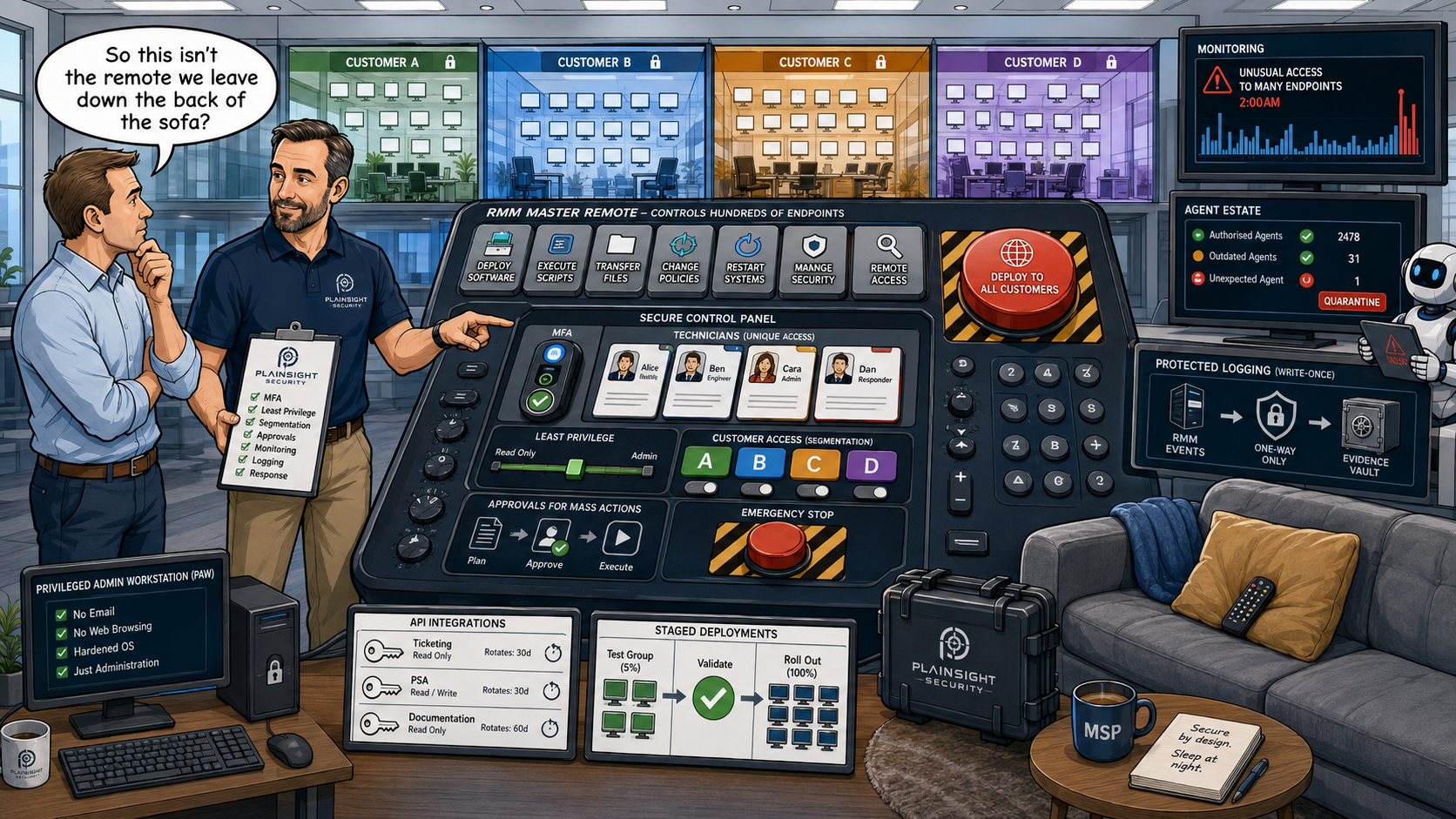
Remote Monitoring and Management (RMM) platforms are essential tools for modern Managed Service Providers (MSPs). They allow technicians to monitor, maintain, patch and administer customer systems remotely.
But that same level of privileged access makes an RMM platform a potentially high-value target for attackers.
If an attacker compromised your RMM platform today, how much of your customer estate could they control?
That is the question MSPs need to be asking.
Why RMM is such an attractive target
An RMM platform may provide technicians with the ability to:
- Execute commands
- Run PowerShell
- Deploy software
- Install updates
- Modify configurations
- Access files
- Restart systems
- Manage security software
- Deploy scripts
- Access multiple customer environments
This means compromising an RMM platform isn't necessarily about compromising one computer.
It could provide an attacker with a route into multiple organisations simultaneously.
This is one reason CISA and partner agencies have warned about attackers abusing legitimate remote-management software. The very capabilities that make RMM useful to an MSP can also make it extremely valuable to an attacker.
Treat the RMM as privileged infrastructure
One of the biggest mistakes an MSP can make is treating its RMM console as simply another SaaS application.
It isn't.
An RMM platform should be treated as a privileged administrative control plane for your customer estate.
That means applying security controls appropriate to highly privileged infrastructure, including:
- Strong authentication
- Multi-factor authentication
- Least privilege
- Separate administrative accounts
- Privileged access controls
- Secure administrator workstations
- Comprehensive logging
- Protective monitoring
- Regular access reviews
The security of the RMM is also dependent on the security of the devices used to administer it. If an attacker compromises a technician's workstation, they may be able to inherit the privileges available to that technician.
Secure administrator accounts
Enabling MFA is important, but it is only one part of securing privileged RMM access.
Give every technician a unique account
Every technician should have their own named account.
This provides accountability and makes it possible to identify exactly who performed an administrative action.
Don't use shared administrator accounts
Shared accounts make attribution difficult and create problems when access needs to be revoked.
If five technicians use the same privileged account, removing one person's access becomes considerably more complicated.
Enforce strong MFA
Every privileged RMM account should use strong MFA.
Where possible, organisations should favour phishing-resistant authentication methods for highly privileged access.
Apply least privilege
A technician who only supports a particular group of customers should not automatically have unrestricted access to every customer managed by the MSP.
Permissions should reflect what each individual actually needs to do their job.
Manage joiners, movers and leavers
Access should change as people change roles and should be removed promptly when someone leaves the organisation.
A former employee retaining access to an RMM platform is potentially much more serious than retaining access to an ordinary business application.
Separate technician workstations from privileged administration
Ask yourself:
Where do your technicians administer your RMM from?
If the answer is:
"Their normal laptop."
you may have an interesting security conversation to have.
A Privileged Access Workstation (PAW), or at least a hardened administrative workstation, can significantly reduce the attack surface around privileged administration.
Depending on the MSP's size and risk profile, consider:
- Dedicated administrative devices
- Separate administrator accounts
- No ordinary email on administrative workstations
- Browser isolation
- Endpoint protection
- Restricted software installation
- Strong device controls
- Reduced internet exposure
The principle is simple: the device used to administer your most powerful systems should not be treated like an ordinary user workstation.
Control what the RMM can actually do
It isn't enough to ask:
"Who can access the RMM?"
You also need to ask:
"What can they do once they're there?"
Review permissions around capabilities such as:
- Script execution
- PowerShell
- Command shells
- Software deployment
- File transfer
- Remote control
- Agent installation
- Policy changes
- Security configuration
- Customer management
- API access
The objective is to minimise the blast radius of a compromised account.
If a technician only needs to deploy software to a particular group of endpoints, there may be little justification for giving that account unrestricted script execution across the entire customer estate.
Separate customers wherever possible
Customer segregation is particularly important for MSPs.
A technician supporting Customer A shouldn't automatically have unrestricted access to Customer B simply because both organisations are managed through the same RMM platform.
Consider:
- Role-based access control
- Customer-specific permissions
- Separate administrative groups
- Delegated administration
- Customer segmentation
- Separate credentials where appropriate
Your customers should not become one large security boundary simply because your RMM platform manages them from one console.
This is particularly important when considering the consequences of a compromised technician account.
Secure RMM agents on customer endpoints
The RMM console isn't the only component that needs protecting.
The agent installed on customer endpoints also needs to be secured.
Consider:
- Keeping agents patched and up to date
- Preventing unauthorised removal
- Restricting who can install agents
- Monitoring agent installation
- Monitoring agent configuration changes
- Identifying unexpected agents
- Removing abandoned agents
- Ensuring agents communicate only with authorised infrastructure
There is another issue MSPs should consider: unauthorised RMM software.
An attacker doesn't necessarily need to compromise your authorised RMM platform. They may instead install their own legitimate remote-management software on a customer endpoint.
Because legitimate RMM tools can be abused for remote access, MSPs should know which remote-management products are authorised across their estate and have mechanisms for identifying unexpected installations.
Monitor RMM activity
If an attacker gains access to an RMM account, authentication logs alone may not tell you what they are doing.
MSPs should monitor both authentication and administrative activity.
Authentication
Look for:
- Successful logins
- Failed logins
- New MFA registrations
- Password resets
- Unusual locations
- Unusual authentication times
Administrative activity
Monitor events such as:
- New accounts
- Permission changes
- New customer access
- Policy changes
- API key creation
Endpoint activity
Look for:
- Mass script execution
- Unusual PowerShell activity
- Large-scale software deployment
- Configuration changes across many endpoints
- Security software being disabled
Behaviour
Context matters.
A technician suddenly accessing 200 customer endpoints at 2am should look very different from their normal activity.
Good monitoring should therefore look for behavioural anomalies, not simply individual suspicious events.
Protect the logs from the RMM itself
There is an important principle here that is easy to overlook.
Don't allow the same privileged tooling used to administer systems to have unrestricted ability to:
Delete or modify the evidence of what it has done.
Important RMM and administrative logs should be forwarded to a separate logging or SIEM platform where practical.
The RMM should not be able to silently remove evidence of its own activity.
This becomes particularly important during an incident. If an attacker compromises the RMM and then uses it to compromise customer endpoints, investigators need reliable records showing what happened.
Secure RMM APIs and integrations
Modern RMM platforms rarely operate in isolation.
They may integrate with:
- PSA platforms
- Ticketing systems
- Microsoft 365
- Documentation platforms
- Backup systems
- Security platforms
- Billing systems
- Automation tools
Every integration potentially creates another route into the management environment.
Review:
- API keys
- OAuth applications
- Service accounts
- Token permissions
- Secret storage
- Key rotation
- Unused integrations
- Third-party access
The principle should be:
Every integration is another identity with another level of trust.
An API key with excessive privileges can be just as dangerous as an administrator account with excessive privileges.
Be careful with automation
Automation is one of the reasons MSPs use RMM platforms in the first place.
It allows a small technical team to manage thousands of endpoints efficiently.
But automation also creates concentration of risk.
One compromised automation mechanism can potentially affect hundreds of endpoints.
Examples include:
- Automated software deployment
- PowerShell scripts
- Configuration policies
- Automated remediation
- Security policy changes
Appropriate controls can include:
- Change approval
- Testing
- Staged deployment
- Limited permissions
- Audit trails
- Rollback procedures
Particularly sensitive automation should not necessarily be allowed to execute across the entire customer estate without appropriate controls.
Don't assume the RMM vendor is responsible for everything
RMM security is a shared responsibility.
The vendor may be responsible for securing:
- Its infrastructure
- Its application
- Its cloud environment
But the MSP remains responsible for how the platform is configured and used.
That includes:
- Accounts
- Permissions
- MFA
- Integrations
- Scripts
- API keys
- Technician devices
- Monitoring
- Customer segregation
A highly secure RMM product can still become a significant security risk if an MSP gives every technician unrestricted access and administers it from poorly secured endpoints.
Test your RMM security
This is where there is a significant difference between having security controls and knowing that those controls work.
Ask:
When was the last time you actually tested whether your RMM security controls work?
Testing could include:
- External attack surface assessment
- RMM management portal testing
- Authentication testing
- Access-control testing
- Privilege escalation testing
- API security testing
- Configuration review
- Internal infrastructure testing
- Compromised-technician scenarios
- Lateral movement from an MSP workstation
The important distinction is:
Having MFA enabled isn't the same as proving that your privileged access model is secure.
A penetration test or security assessment can help identify weaknesses that aren't obvious from a configuration checklist.
What happens if the RMM is compromised?
MSPs should have an incident-response plan that specifically considers compromise of their RMM platform.
You should already know:
- Who can disable RMM access?
- Who can revoke active sessions?
- Who can disable compromised accounts?
- How will customer access be isolated?
- How will customers be notified?
- How will scripts and automation be stopped?
- How will compromised endpoints be identified?
- Where are the logs?
- How will backups be protected?
- How will the MSP continue supporting customers?
This should not be something you work out during the incident.
The consequences of an RMM compromise can extend beyond the MSP itself, so customer communication and contractual responsibilities should also be understood in advance.
RMM security checklist
- MFA enforced for all RMM administrators
- No shared privileged accounts
- Least privilege implemented
- Customer environments appropriately segregated
- Technician access regularly reviewed
- Leavers removed immediately
- Administrative workstations secured
- RMM agents kept up to date
- Unauthorised RMM software detected
- RMM activity centrally logged
- Logs protected from modification and deletion
- API keys and integrations regularly reviewed
- Automation appropriately controlled
- RMM access included in incident-response planning
- RMM security independently assessed
Your RMM is part of your security boundary
RMM platforms are fundamental to how modern MSPs operate. They allow relatively small teams to manage large numbers of endpoints efficiently and consistently.
That power is precisely what makes them attractive to attackers.
The objective isn't to eliminate remote administration. It is to ensure that compromising one technician, one endpoint or one credential doesn't give an attacker an easy route to every customer you manage.
Your RMM platform is one of the most powerful tools in your MSP. Treat it accordingly.

Written by
Mark Tomlinson
Our lead penetration tester, Mark Tomlinson, holds The Cyber Scheme Team Leader qualification in infrastructure penetration testing, an advanced certification recognised by the National Cyber Security Centre (NCSC) and used by professionals testing government systems and UK critical national infrastructure. Mark is also registered with the UK Cyber Security Council as a Principal Cyber Security Professional (PriCSP) specialising in Security Testing and holds an MSc in Computer Science with Cyber Security.
More about how we workPut this into practice.
Cyber Essentials, Cyber Essentials Plus, and penetration testing — fixed-price, plain English, and built to stay out of your way.