
Is Your Microsoft 365 Tenant Actually Secure?
Microsoft 365 provides powerful security controls, but they still need to be configured correctly. This article highlights the key security checks SMEs should perform and why regular reviews are essential.
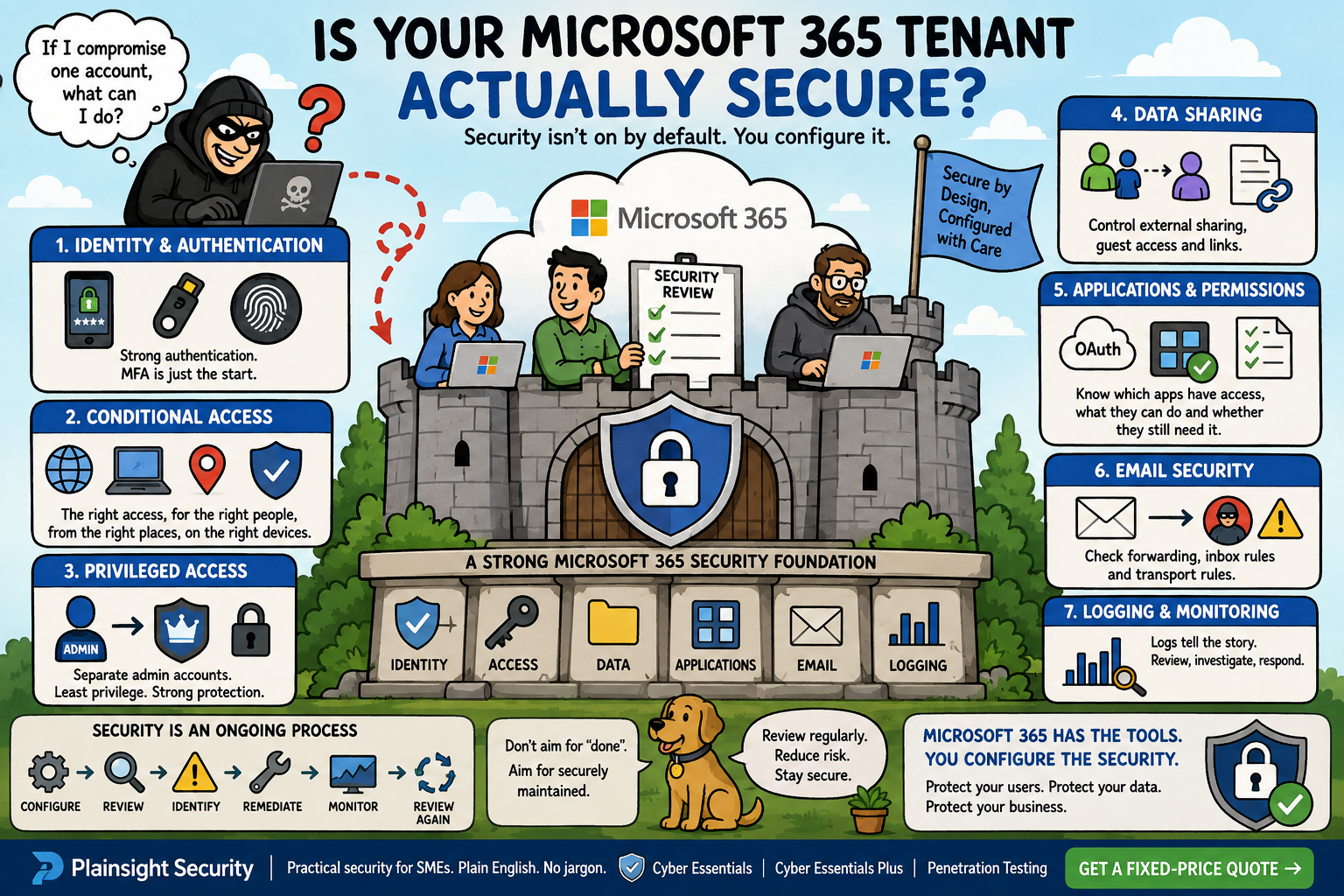
Microsoft 365 is used by millions of organisations to manage email, documents, collaboration, identity and business data. For many SMEs, it has become one of the most important parts of their IT infrastructure.
But there is an important distinction between having Microsoft 365 configured and having Microsoft 365 securely configured.
A tenant can be fully operational, have MFA enabled and still contain unnecessary privileges, excessive external access, risky applications or configuration weaknesses that could increase the impact of an account compromise.
A simple question is therefore worth asking:
If an attacker compromised one of our Microsoft 365 accounts today, how much could they actually do?
Microsoft 365 isn't automatically secure because Microsoft runs it
A common assumption is:
"We're using Microsoft 365, so Microsoft looks after the security."
There is some truth in this, but it misses an important part of the picture.
Microsoft is responsible for securing the underlying Microsoft 365 service and infrastructure. The customer remains responsible for how the service is configured and used.
That includes areas such as:
- Identities
- Authentication
- Permissions
- Devices
- Configuration
- Data sharing
- Applications
- Administrative access
Microsoft provides a huge range of security controls. It does not automatically know what level of security is appropriate for your organisation, which users should have administrative privileges or which third-party applications your employees should be allowed to access.
The key distinction is:
Microsoft provides the security controls. Your organisation still has to configure and use them correctly.
Start with identity: how are users actually authenticating?
Identity is arguably the most important part of a Microsoft 365 security review.
An attacker who obtains valid credentials may be able to access email, documents, Teams conversations and other business resources. The effectiveness of the controls protecting those identities therefore matters enormously.
A review should consider:
- MFA coverage
- Authentication methods
- Authentication policies
- Password authentication
- Security defaults
- Conditional Access
- Authentication strengths
- Legacy authentication
The important question isn't simply:
"Do we have MFA?"
It is:
Can every user access Microsoft 365 using an appropriately strong authentication method, or are some accounts still relying primarily on passwords?
This becomes particularly important when considering modern authentication methods such as passkeys and FIDO2 security keys.
Passwords are attractive targets for attackers because they are shared secrets that can be stolen, guessed, reused or captured through phishing.
A modern Microsoft 365 security strategy should therefore consider not just whether MFA exists, but how users authenticate and how resistant that authentication is to phishing.
MFA: enabled doesn't necessarily mean equally secure
Turning on MFA is an important security improvement, but "MFA enabled" doesn't tell you everything you need to know.
There are significant differences between authentication methods.
A simplified progression might look something like:
Password only
↓
Password + SMS
↓
Password + authenticator app
↓
Number matching
↓
Phishing-resistant authentication
Microsoft 365 can support a range of authentication mechanisms, including authenticator applications, hardware security keys, passkeys and FIDO2-based authentication.
The precise controls available will depend on the organisation's Microsoft licensing and configuration.
The important point is that MFA should not be treated as a binary checkbox.
MFA significantly improves security, but not all MFA provides the same level of protection against modern phishing attacks.
For organisations handling sensitive information or operating accounts with significant privileges, stronger authentication deserves particular attention.
Legacy authentication: the old door you forgot about
Modern authentication controls are considerably more useful when older authentication methods have been removed or appropriately restricted.
Legacy authentication refers to older authentication mechanisms that don't support modern authentication features in the same way. Depending on the protocol and configuration, this can create opportunities for attackers to attempt authentication without benefiting from controls such as modern MFA.
Examples worth reviewing include:
- POP
- IMAP
- SMTP AUTH
- Older email clients
- Other applications using legacy authentication
- Authentication policies allowing older protocols
The practical question is:
Do you know whether anything in your tenant still requires legacy authentication?
If something genuinely requires an older protocol, it should be understood and documented rather than simply left enabled because "something might need it."
Authentication logs can also help identify systems and users still attempting to use older methods.
Conditional Access: Microsoft's security engine room
Conditional Access is one of the most powerful parts of Microsoft's identity security architecture.
Rather than treating every authentication attempt identically, Conditional Access can make access decisions based on context.
For example:
Who is accessing the service?
What are they accessing?
Where are they accessing it from?
What device are they using?
How are they authenticating?
This allows organisations to implement policies such as:
- Require MFA for administrators
- Block legacy authentication
- Require compliant devices
- Apply stronger authentication to sensitive resources
- Restrict access based on risk or location
- Apply additional controls to privileged accounts
However, Conditional Access can become complicated very quickly.
Poorly designed policies can introduce exclusions, overlapping rules or unintended gaps. A policy that appears secure on paper may also contain exceptions that undermine its purpose.
A proper review should therefore consider not just whether Conditional Access exists, but what the policies actually enforce, which users and applications they apply to, and where exceptions exist.
Administrator accounts deserve special treatment
Administrator accounts represent a particularly attractive target.
A compromised ordinary user account might expose one user's email and files. A compromised highly privileged account could potentially allow an attacker to make changes across the tenant.
For that reason, administrators shouldn't routinely use highly privileged accounts for normal activities such as reading email or browsing the web.
A security review should consider:
- Separate administrator accounts
- Global Administrator assignments
- Privileged Role Administrator assignments
- Exchange Administrator assignments
- Security Administrator assignments
- Least-privilege principles
- Strong authentication for administrators
- Phishing-resistant authentication where appropriate
- Privileged Identity Management where available and appropriate
One particularly useful question is:
If an administrator's everyday account is compromised, how much of your Microsoft 365 environment can the attacker control?
The answer should not be "everything".
Reducing the number of highly privileged accounts and limiting when those privileges are used can significantly reduce the potential impact of an account compromise.
External sharing: who can access your data?
Microsoft 365 makes collaboration easy. That is one of its strengths.
It can also make it easy to share information outside the organisation without fully considering the consequences.
SharePoint, OneDrive and Teams all provide mechanisms for external collaboration and guest access.
A review should consider:
- SharePoint external sharing
- OneDrive sharing
- Teams guest access
- Guest users
- Anonymous or broadly accessible links
- External collaboration policies
- Dormant external accounts
There is a significant difference between asking:
"Can we share this document externally?"
and asking:
"Who can access this document, under what conditions, and for how long?"
The second question is much more useful from a security perspective.
Guest accounts are particularly worth reviewing. Someone who was invited to collaborate on a project two years ago may still have access even though they no longer need it.
Mail forwarding: a simple feature with security implications
Email forwarding and inbox rules are another area that can be overlooked.
If an attacker compromises an account, they may attempt to create rules or forwarding arrangements that allow them to monitor messages without immediately attracting attention.
Depending on the circumstances, this could allow an attacker to:
- Capture incoming messages
- Hide security notifications
- Monitor sensitive conversations
- Intercept invoices
- Maintain visibility into an account after the initial compromise
A review should consider:
- Mailbox forwarding
- Inbox rules
- Transport rules
- External forwarding
- Suspicious forwarding destinations
For SMEs, this is particularly important because email is often central to financial transactions, customer communications and password-reset processes.
An attacker who can silently monitor a mailbox may gain considerably more information than simply reading the messages they initially find.
OAuth applications: the permissions users forget about
Modern applications increasingly integrate with Microsoft 365.
Users may grant third-party applications permission to access organisational resources. These applications aren't necessarily malicious. The security concern is often that the organisation simply doesn't know what access has been granted.
An application could potentially request permission to:
- Read email
- Send email
- Access files
- Read user information
- Access SharePoint data
- Perform other actions on behalf of a user or application
This makes application governance an important part of Microsoft 365 security.
A review should consider:
- Enterprise applications
- App registrations
- User consent
- Administrator consent
- Delegated permissions
- Application permissions
- Excessive privileges
- Unused applications
There is an important distinction between delegated permissions and application permissions.
Delegated permissions generally allow an application to act on behalf of a signed-in user. Application permissions can allow an application to operate without a user actively being present and can therefore represent a particularly significant privilege.
The question to ask is:
Do we know which applications have access to our Microsoft 365 data, what permissions they have, and whether they still need them?
Audit logging: can you see what is happening?
Security controls are much more useful when suspicious activity can actually be investigated.
If an employee reports that their account has been compromised, for example, you may need to establish:
- Who logged in?
- Where did they log in from?
- What authentication method was used?
- What happened immediately before the suspected compromise?
- What administrative changes were made?
- What happened afterwards?
Relevant sources of information can include:
- Microsoft Purview Audit
- Microsoft Entra sign-in logs
- Microsoft Entra audit logs
- Exchange activity
- SharePoint and OneDrive activity
- Administrative activity
Logging isn't simply about collecting enormous amounts of data.
It is about ensuring that important security events are available for investigation and that the organisation understands what information is retained and for how long.
For smaller organisations without a dedicated security team, this can be especially important when responding to an incident.
Secure Score isn't the same thing as being secure
Microsoft Secure Score is useful.
It provides recommendations and helps organisations identify security improvements. It can also provide a useful way of tracking progress.
But:
A high Secure Score does not mean your Microsoft 365 tenant is secure.
Secure Score should be treated as an indicator and source of recommendations rather than a comprehensive security assessment.
A tenant could have a good score while still having issues such as:
- Excessive privileges
- Risky guest access
- Poor application governance
- Weak administrative practices
- Unnecessary external sharing
- Configuration problems outside the scope of Secure Score
The sensible approach is therefore:
Use Secure Score as one source of information, not as the final verdict on your security posture.
Configuration drift: security doesn't stay fixed
One of the biggest problems with security configuration is assuming that once something has been secured, it will remain secure indefinitely.
Microsoft 365 environments change constantly.
Over the course of a year, an organisation might introduce:
- New users
- New administrators
- New applications
- New Conditional Access policies
- New guest users
- New sharing requirements
- New SaaS integrations
- New Microsoft 365 features
People also leave organisations, change roles and take on new responsibilities.
A configuration that was appropriate twelve months ago may no longer be appropriate today.
This is why Microsoft 365 security should be treated as an ongoing process rather than a one-time configuration exercise.
A practical Microsoft 365 security review
A structured review can help identify areas that deserve further investigation.
Identity
- MFA enabled for appropriate users
- Strong authentication methods configured
- Legacy authentication disabled or appropriately restricted
- Risky sign-ins reviewed
Privileged access
- Separate administrator accounts used
- Least privilege applied
- Administrator accounts protected with strong authentication
- Unused privileged accounts removed
Conditional Access
- Appropriate MFA policies configured
- Legacy authentication blocked
- Device and location controls considered
- Policies tested and monitored
- Policy exclusions reviewed
Data sharing
- External sharing reviewed
- Guest accounts reviewed
- Anonymous or broadly accessible links controlled
- Sensitive data sharing appropriately restricted
Applications
- OAuth applications reviewed
- Unnecessary applications removed
- User consent appropriately controlled
- Excessive permissions investigated
- Unused enterprise applications identified
- External forwarding reviewed
- Suspicious inbox rules monitored
- Mail security configuration reviewed
- Transport rules reviewed
Logging
- Audit logging enabled
- Sign-in logs available
- Administrative activity monitored
- Appropriate retention considered
What does a Microsoft 365 security assessment add?
Checking all of these controls manually can be time-consuming, particularly as an organisation grows and its Microsoft 365 environment becomes more complicated.
A structured Microsoft 365 security assessment can provide a more systematic view of the tenant.
Depending on the scope, this might include:
- Configuration review
- Identification of security weaknesses
- Comparison against recognised security recommendations
- Prioritised findings
- Supporting evidence
- Remediation recommendations
- Follow-up verification
The objective isn't simply to produce a long list of settings.
The real value is understanding which weaknesses matter, why they matter and what should be done about them.
The question isn't whether Microsoft 365 has security features. It does.
The question is:
Has your organisation configured those features appropriately for its risk profile?
Microsoft 365 security is an ongoing process
There is no point at which a Microsoft 365 tenant can simply be declared "secure" and forgotten about.
A more realistic approach is:
Configure
↓
Review
↓
Identify weaknesses
↓
Remediate
↓
Monitor
↓
Review again
This is particularly important for SMEs because Microsoft 365 often becomes the central identity and data platform for the entire organisation.
It may contain years of email, sensitive documents, financial information, customer data and access to other cloud services.
Protecting that environment therefore requires more than simply purchasing Microsoft 365 licences and enabling MFA.
Final takeaway
Microsoft 365 provides an enormous range of security controls, but those controls don't automatically protect an organisation simply because they exist.
Authentication, privileged access, Conditional Access, external sharing, application permissions and logging all need to be considered as part of the organisation's overall security posture.
And remember that security configuration can change over time.
A Microsoft 365 tenant that was configured correctly a year ago may not be configured correctly today.
Regular security reviews can help identify configuration weaknesses before they become an opportunity for an attacker.

Written by
Mark Tomlinson
Our lead penetration tester, Mark Tomlinson, holds The Cyber Scheme Team Leader qualification in infrastructure penetration testing, an advanced certification recognised by the National Cyber Security Centre (NCSC) and used by professionals testing government systems and UK critical national infrastructure. Mark is also registered with the UK Cyber Security Council as a Principal Cyber Security Professional (PriCSP) specialising in Security Testing and holds an MSc in Computer Science with Cyber Security.
More about how we workPut this into practice.
Cyber Essentials, Cyber Essentials Plus, and penetration testing — fixed-price, plain English, and built to stay out of your way.