
Insecure File Uploads: How Uploading a File Can Compromise a Web Application
File uploads are a common but often overlooked web application attack surface. This article explains how insecure upload handling can lead to data exposure, malware distribution, denial of service and potentially code execution.
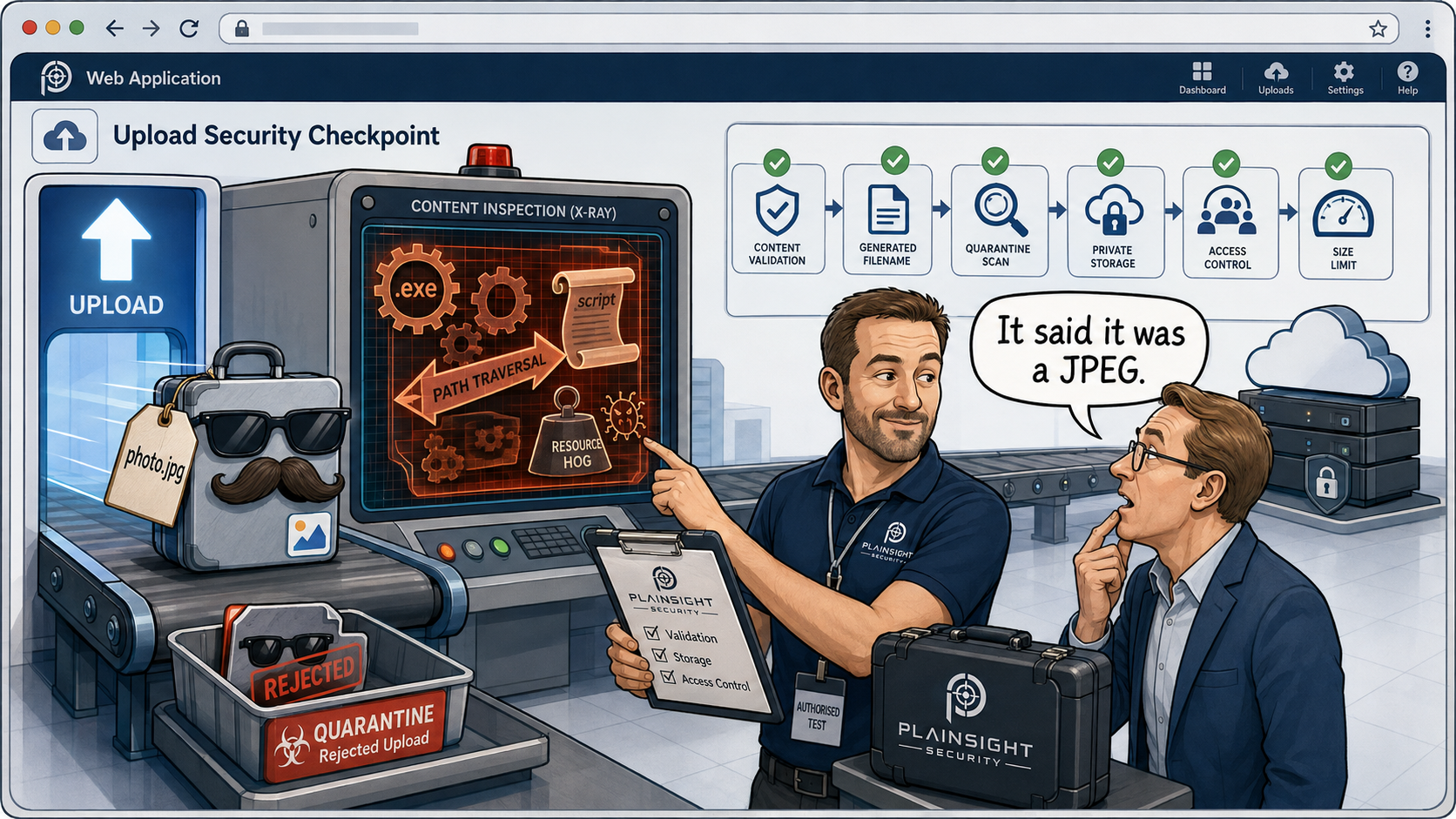
"Upload your profile picture."
"Attach a document."
"Upload your CV."
File uploads are everywhere. They are a normal feature of modern web applications and, most of the time, they appear relatively harmless.
But from a security perspective, a file upload function can represent a surprisingly large attack surface.
The application knows what it expects you to upload. An attacker knows they can try uploading something else.
A user-controlled upload can contain attacker-controlled:
- File contents
- Filename
- Extension
- MIME type
- Metadata
- File size
- Path information
That means an upload function needs to treat every uploaded file as untrusted input.
What is an insecure file upload vulnerability?
An insecure file upload vulnerability occurs when a web application insufficiently validates, processes, stores or serves files supplied by users, allowing an attacker to perform actions the application was not intended to permit.
The consequences can vary significantly.
A poorly secured upload function might allow someone to upload an unexpected file type. In other circumstances, it could expose another user's documents, allow files to overwrite existing content, consume excessive storage or processing resources, or, in the worst cases, provide a route to server-side code execution.
The important point is that there isn't a single "file upload vulnerability". The risk depends on what the application does with the uploaded file.
Why checking the file extension isn't enough
One of the simplest ways an application might attempt to restrict uploads is to check the filename.
For example:
photo.jpg
The application might assume that because the filename ends in .jpg, it must be an image.
But the filename is simply information supplied by the client.
It does not prove what the file actually contains.
An attacker can manipulate the filename, extension and other properties of the request. They may also be able to influence the contents of the file itself.
There is an important distinction between:
What the filename says the file is
and:
What the file actually contains.
A file called photo.jpg isn't necessarily a JPEG image.
This is why secure applications should validate the actual content of an upload rather than relying solely on its filename.
MIME type validation isn't a complete defence
Applications sometimes take this a step further by checking the HTTP Content-Type header.
For example:
Content-Type: image/jpeg
This may look more reliable than checking the filename, but the value is still supplied by the client.
An attacker can send a request claiming that a file is an image when the contents do not actually correspond to the expected format.
MIME type validation can therefore be useful as one layer of defence, but it should not be treated as a security boundary on its own.
The general principle is simple:
Client-controlled metadata should never automatically be trusted.
What can an attacker actually do?
It is important not to give the impression that every insecure file upload vulnerability results in remote code execution.
The impact can range from relatively minor issues to complete application compromise.
Lower-impact consequences
An insecure upload might result in:
- Unexpected file types being stored
- Excessive disk usage
- Information disclosure
- Unwanted content being hosted by the application
More serious consequences
Depending on the application, an attacker might be able to:
- Upload content that executes JavaScript in another user's browser
- Distribute malicious files through the application
- Access files belonging to other users
- Overwrite existing files
- Manipulate files processed by other components
Potentially critical consequences
In the most serious cases, an insecure upload may contribute to:
- Server-side code execution
- Remote code execution
- Compromise of the underlying server
The actual impact depends heavily on where the file is stored, what processes it, and what happens when somebody subsequently requests it.
The dangerous combination: uploading executable content
One classic scenario occurs when an application stores uploaded files in a directory that is accessible through the web server.
Imagine an application stores uploads under:
/uploads/
If the web server is configured to execute certain server-side file types, and an attacker can upload executable content into that directory, the upload functionality could potentially become a route to code execution.
The important question isn't simply:
"Does the application allow file uploads?"
It is:
"Can an attacker cause the application or web server to interpret uploaded content as executable code?"
Modern architectures can reduce this risk significantly, but developers should not assume that a particular storage location is safe without understanding how the entire application and hosting environment handle uploaded files.
Where are uploaded files stored?
Storage location is an important part of the security model.
Applications might store uploads:
- Inside the web root
- Outside the web root
- On separate storage
- In object storage
- Behind an application-controlled download mechanism
These approaches can have very different security characteristics.
For example, placing an uploaded file directly into a publicly accessible web directory may allow users to request it directly from the web server.
Alternatively, an application might store files in private object storage such as Amazon S3, Azure Blob Storage or DigitalOcean Spaces, and only provide access through application-controlled functionality.
Neither approach is automatically secure or insecure. What matters is how the storage, permissions, URLs and application logic are configured.
The key question is:
Can an attacker directly access or execute something they have uploaded, without the application deliberately allowing it?
Can users access each other's uploads?
File uploads also introduce another important security consideration: access control.
Consider an application that provides a download endpoint such as:
/download/12345
If changing the identifier to:
/download/12346
allows one customer to retrieve another customer's document, the problem isn't necessarily the upload itself.
It is an access-control vulnerability, potentially an IDOR or broken object-level authorisation issue.
This is an important distinction because secure file handling isn't just about what users can upload.
It is also about who can subsequently access those files.
An application should verify that the requesting user is authorised to access the specific file, rather than simply assuming that knowing an identifier is sufficient.
Image uploads aren't automatically safe
Images are often considered relatively harmless because they aren't normally executable programs.
But an uploaded image may pass through several different components:
- The application receives the file.
- The file is validated.
- It is stored.
- Metadata may be extracted.
- An image-processing library may open it.
- A thumbnail may be generated.
- The image may be converted into another format.
- The resulting file may be served to another user.
Every additional processing step potentially introduces another attack surface.
Image-processing libraries have historically contained vulnerabilities, and malformed files can sometimes trigger unexpected behaviour in software parsing them.
There can also be security considerations around metadata, image conversion and thumbnail generation.
The lesson is not that image uploads are inherently dangerous.
It is that an uploaded image should still be considered untrusted data.
Filename attacks
The filename itself can also create security problems.
Applications that use user-supplied filenames directly may encounter issues involving:
- Path traversal
- Unexpected characters
- Duplicate filenames
- Filename collisions
- File overwriting
- Unicode and encoding issues
For example, an attacker might attempt to manipulate a filename using path components such as:
../../some-sensitive-file
Whether this actually works depends on how the application handles the filename and the underlying operating system and storage mechanism.
A better approach is generally to avoid using attacker-controlled filenames as storage paths.
The application can instead generate its own unique identifier for the stored file and retain the original filename separately as metadata where necessary.
Denial of service through file uploads
Not every file-upload vulnerability involves gaining access to a server.
An attacker may instead try to consume resources.
For example, they could upload:
- Extremely large files
- Huge numbers of files
- Files designed to consume processing resources
- Files that trigger expensive image or document processing
An application should therefore consider controls such as:
- Maximum file sizes
- Upload quotas
- Rate limiting
- Processing limits
- Storage limits
- Resource monitoring
This is particularly important for applications that allow unauthenticated uploads or provide upload functionality to large numbers of users.
A single upload might be harmless. Thousands of them can be a very different problem.
Malware uploads
If users can upload files that other users can subsequently download, the application can potentially become a malware distribution mechanism.
Depending on the application's purpose and threat model, appropriate controls may include:
- Antivirus scanning
- Malware scanning
- File reputation checks
- Sandboxing where appropriate
- Quarantine
- Blocking dangerous file types
However, malware scanning should be viewed as an additional security control, not a replacement for secure file validation and storage.
A file that passes an antivirus scan can still present other security risks, such as an access-control problem, excessive resource consumption or exploitation of a vulnerable processing library.
How should applications securely handle uploads?
There is no single control that makes a file upload secure.
A robust implementation generally uses multiple layers of protection.
Validate the actual file type
Don't rely solely on the filename extension or the MIME type supplied by the client.
Where appropriate, inspect the file contents and expected format.
Allowlist expected formats
If an application only needs to accept JPEG images, accept JPEG images rather than attempting to create a blacklist of every potentially dangerous file type.
An allowlist is generally easier to reason about and maintain.
Generate server-side filenames
Don't use attacker-controlled filenames as storage paths.
Generate unique storage identifiers and treat the original filename as untrusted metadata.
Store uploads safely
Uploaded content should be stored somewhere that cannot unexpectedly result in code execution.
Where appropriate, keep uploaded files outside the web root or use private object storage.
Apply access controls
Users should only be able to retrieve files they are authorised to access.
This needs to be enforced server-side rather than relying on predictable URLs or identifiers remaining secret.
Limit size and volume
Implement appropriate limits for:
- Individual files
- Total storage
- Number of uploads
- Processing time
- Request rates
These controls help reduce the risk of resource exhaustion.
Scan files
Where appropriate for the application's threat model, scan uploaded files for malware and quarantine suspicious content.
Secure downstream processing
Keep image, document and other file-processing libraries patched.
Remember that the upload isn't necessarily the end of the attack surface. The file may subsequently be opened, converted, indexed, compressed or otherwise processed by another application component.
How penetration testers test file uploads
A professional penetration test doesn't simply involve uploading a suspicious file and seeing what happens.
The tester needs to understand the complete lifecycle of the uploaded file.
Testing may examine:
- Extension validation
- MIME type validation
- File signature and magic-byte validation
- Filename handling
- Path traversal
- File overwriting
- Storage location
- Access controls
- Direct object access
- Image and document processing
- Malware handling
- Size limits
- Rate limiting
- Execution behaviour
- Content delivery
- Multi-tenant isolation
The tester may also examine how the application behaves when the same file is accessed through different interfaces or after being processed by other components.
For example, an uploaded image might be harmless when initially stored but expose a weakness when it is subsequently resized or converted.
Similarly, a file might be correctly stored but improperly exposed to another customer through a predictable download endpoint.
The goal is therefore not simply to answer:
"Can I upload a malicious file?"
It is to understand:
"What can an attacker make the application do with a file they control?"
A file upload vulnerability isn't always obvious
An upload feature can appear secure during normal use while still containing weaknesses.
Consider this statement:
"The application only accepts JPEG files."
That sounds reassuring.
But a security tester needs to ask:
- How is a JPEG identified?
- Is the file content actually validated?
- Is the client-controlled MIME type trusted?
- Where is the file stored?
- Can it be executed?
- Who can access it?
- Is it processed by another component?
- Can it overwrite another file?
- Can it consume excessive resources?
- Can another tenant access it?
These questions reveal why file-upload security is more complicated than checking an extension.
The bigger picture
File uploads are a classic example of why application security needs to consider more than individual input fields.
The upload itself may be perfectly valid.
The vulnerability may occur later, when the application:
- Stores the file
- Processes the file
- Generates a thumbnail
- Extracts metadata
- Constructs a download URL
- Authorises access
- Serves the file
- Passes it to another system
A secure upload function therefore requires consideration of the entire journey of the file through the application.
Final takeaway
File uploads should be treated as an untrusted input boundary, not as a simple convenience feature.
Checking an extension or MIME type is only one part of securing an upload function. The application needs to consider the entire lifecycle of the file: validation, storage, processing, access control and retrieval.
For developers and security teams, the question isn't simply:
"Can a user upload a file?"
It is:
"What can an attacker make the application do with a file they control?"
That is the question that turns a seemingly harmless upload function into something worth testing properly.

Written by
Mark Tomlinson
Our lead penetration tester, Mark Tomlinson, holds The Cyber Scheme Team Leader qualification in infrastructure penetration testing, an advanced certification recognised by the National Cyber Security Centre (NCSC) and used by professionals testing government systems and UK critical national infrastructure. Mark is also registered with the UK Cyber Security Council as a Principal Cyber Security Professional (PriCSP) specialising in Security Testing and holds an MSc in Computer Science with Cyber Security.
More about how we workPut this into practice.
Cyber Essentials, Cyber Essentials Plus, and penetration testing — fixed-price, plain English, and built to stay out of your way.