
What Is Web Application Security? A Practical Guide for Businesses
A practical guide to web application risks, scanning limitations and how manual penetration testing helps protect applications and customer data.
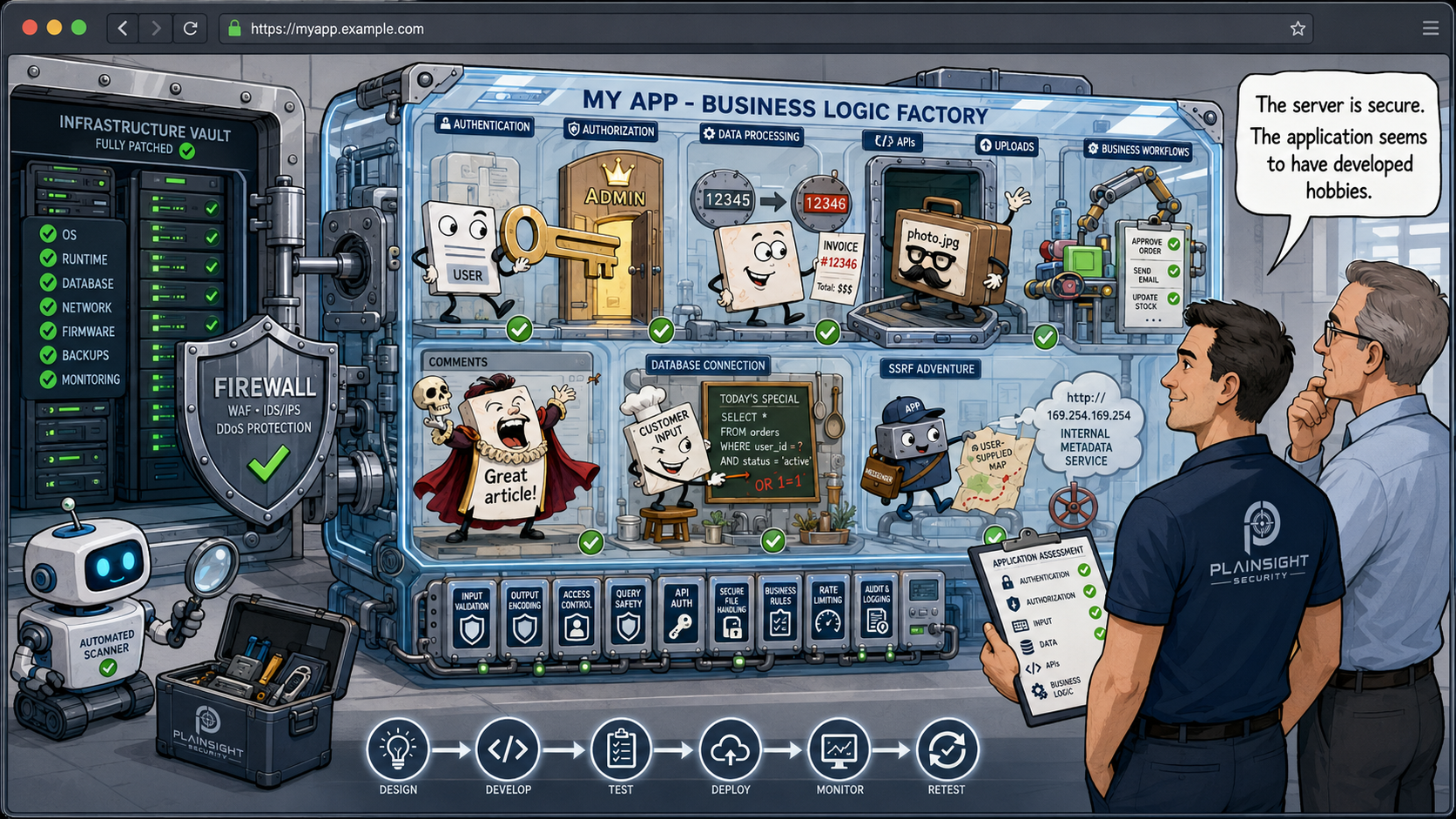
Web application security is the practice of protecting websites and web-based applications from vulnerabilities that could allow attackers to access data, accounts, functionality or systems they should not be able to access.
For businesses, this means more than simply securing the server hosting an application or putting a firewall in front of it. Modern web applications contain their own authentication, authorisation, data processing and business logic. A vulnerability in any of these areas can give an attacker access to information or functionality they should never have.
A secure server does not necessarily mean a secure application.
Why Are Web Applications a Security Risk?
Web applications have become an essential part of how businesses operate. They may provide customer portals, online banking, booking systems, e-commerce platforms, internal business systems and APIs that connect different services.
As a result, applications can expose a significant amount of functionality and sensitive information, including:
- Customer accounts
- Personal information
- Payment functionality
- APIs
- Administrative functions
- File uploads
- Databases
- Third-party integrations
An attacker does not necessarily need to compromise the underlying server to cause significant damage.
Instead, they may find a way to make the application do something it was never intended to do.
For example, an application may correctly prevent a customer from viewing another customer's account through its normal interface. However, if changing an account number in a URL allows the attacker to retrieve someone else's information, the application has an access-control vulnerability.
The server may be fully patched. The firewall may be correctly configured. The operating system may have no known vulnerabilities.
The application can still be vulnerable.
Common Web Application Vulnerabilities
Web application vulnerabilities come in many forms. Some are technical weaknesses, while others arise from the way an application has been designed or how its functionality is implemented.
Broken Access Control
Access controls determine what users are allowed to do and what information they are allowed to access.
A broken access control vulnerability could allow one customer to access another customer's information simply by changing an ID in a URL.
For example:
/customer/123
might be changed to:
/customer/124
If the application returns the details belonging to customer 124, rather than checking whether the logged-in user is authorised to access that account, there is a potentially serious security problem.
This type of vulnerability is particularly important for applications that support multiple customers, organisations or tenants.
Authentication Weaknesses
Authentication is the process of establishing who a user is.
Weaknesses in authentication can include:
- Poor password controls
- Weak password-reset mechanisms
- Authentication bypasses
- Insecure multi-factor authentication implementations
- Session management weaknesses
- Account enumeration
- Poorly implemented "remember me" functionality
A vulnerability in authentication can turn an otherwise secure application into a straightforward route to unauthorised access.
SQL Injection
SQL injection occurs when an attacker can manipulate database queries through application input.
If an application does not properly handle user-supplied data, an attacker may be able to alter the database query being executed.
Depending on the circumstances, this could allow an attacker to access, modify or delete information.
Modern development frameworks and database libraries provide protections against many common forms of SQL injection, but applications still need to be designed and tested correctly.
Cross-Site Scripting (XSS)
Cross-site scripting, commonly known as XSS, occurs when an application allows attacker-controlled content to be interpreted as executable code in another user's browser.
The impact depends on the circumstances and the type of XSS involved. It can include compromising user sessions, manipulating application content or carrying out actions in the context of another user.
The important point for businesses is that something as simple as displaying user-supplied information can become a security issue if it is not handled safely.
Insecure File Uploads
File upload functionality can introduce significant security risks.
Applications may allow users to upload profile pictures, documents, images or other files. Security problems can arise when an application does not properly validate what is being uploaded, where it is stored or how it is subsequently processed.
Potential consequences include malicious files being stored or executed, unauthorised access to uploaded content, or attacks against other systems that process the uploaded files.
File uploads therefore need to be considered as part of the application's wider attack surface.
Server-Side Request Forgery
Server-side request forgery, or SSRF, occurs when an attacker can influence a server into making requests to destinations that the attacker should not be able to access directly.
This can be particularly significant in cloud environments, where internal services or metadata endpoints may contain sensitive information.
The application may effectively become a proxy that allows an attacker to reach systems that were never intended to be exposed to them.
Security Misconfiguration
Security misconfiguration covers a wide range of issues, including:
- Unnecessary services
- Debug functionality left enabled
- Excessive permissions
- Insecure default settings
- Poorly configured security controls
- Unnecessary information exposed to users
Some configuration issues are straightforward to identify through automated scanning. Others only become apparent when the application's functionality and intended security model are understood.
Information Disclosure
Applications sometimes reveal more information than they should.
Examples include:
- Detailed error messages
- Stack traces
- Internal hostnames
- Database information
- Software versions
- Debug information
- Sensitive data contained in API responses
An individual piece of information may appear harmless. However, information disclosed by an application can help an attacker understand its underlying infrastructure and identify further attack opportunities.
Insecure APIs
Modern web applications frequently rely on APIs.
An API may expose functionality for mobile applications, customer portals, integrations or internal systems.
API vulnerabilities can include broken authorisation, excessive data exposure, weak authentication and insufficient input validation.
An API should therefore be treated as part of the application's attack surface, rather than as an inherently trusted connection between systems.
Business Logic Vulnerabilities
Some of the most interesting application vulnerabilities do not fit neatly into a technical vulnerability category.
Business logic vulnerabilities occur when an attacker can abuse legitimate functionality in an unintended way.
For example, imagine an application that allows customers to purchase an item, cancel the order and receive a refund.
If the application's workflow allows someone to repeatedly manipulate those actions to receive more money than they originally paid, the underlying functions may all be working as designed. The vulnerability lies in how those functions can be combined.
These vulnerabilities are particularly difficult for automated scanners to identify because understanding them requires an understanding of how the application is supposed to operate.
Not All Web Application Vulnerabilities Are Found by Vulnerability Scanners
Vulnerability scanners are extremely useful security tools, but they are not a replacement for manual security testing.
Automated scanning is particularly good at identifying issues such as:
- Known vulnerable software
- Common configuration problems
- Missing security headers
- Known CVEs
- Common injection patterns
These checks can be performed quickly and repeatedly, making automated scanning an important part of a security programme.
However, there are other vulnerabilities that require a tester to understand how an application works and deliberately attempt to misuse it.
Manual testing is particularly important when investigating:
- Authorisation
- Multi-tenant isolation
- Business logic
- Privilege escalation
- Complex authentication flows
- Chained vulnerabilities
- Unexpected application behaviour
An application can therefore have no obvious scanner findings and still contain serious security vulnerabilities.
This distinction is important.
A vulnerability scanner generally asks:
"Does this application appear to have known or detectable security weaknesses?"
A skilled penetration tester can ask:
"What happens if I use this application in a way the developer did not anticipate?"
That second question is often where the more subtle vulnerabilities are found.
What Is a Web Application Penetration Test?
A web application penetration test is an authorised security assessment in which experienced testers attempt to identify and exploit vulnerabilities in an application, using techniques similar to those available to real attackers.
The objective is not simply to produce a list of potential weaknesses. A penetration test should establish whether vulnerabilities are actually exploitable and what their potential impact could be.
Depending on the scope of the engagement, testing may include:
- Authentication
- Authorisation
- Session management
- Input validation
- File handling
- APIs
- Access controls
- Business logic
- Error handling
- Data exposure
The tester will typically combine automated tooling with manual investigation.
Automated tools can help identify potential attack paths, while manual testing allows the tester to investigate how individual functions interact and whether security controls can be bypassed.
A Simple Example: Can I Access Another Customer's Data?
Consider an application that provides customers with access to their own records.
A customer is given the following URL:
https://example.com/customer/123
The application correctly displays customer 123's information.
During testing, the tester changes the number:
https://example.com/customer/124
If the application returns customer 124's information, despite the logged-in user having no permission to access it, the application has an access-control problem.
This may be described as an insecure direct object reference (IDOR) or, more broadly, broken access control.
The important issue is not the terminology.
The important issue is that one customer may be able to access another customer's information.
An automated scanner may be able to identify that the URL parameter exists. It may not understand that customer 123 and customer 124 represent different customers, nor that the logged-in user should only be able to access one of them.
That requires understanding the application's security model and testing it accordingly.
Web Application Security Isn't Just About the OWASP Top 10
The OWASP Top 10 is an excellent resource for understanding common web application security risks.
However, it should not be treated as a definitive test that determines whether an application is secure.
An application can have no obvious examples of the vulnerabilities covered by a particular automated test and still contain a serious security weakness.
Business logic is a good example.
An application might correctly authenticate users, securely store passwords and properly validate input. Yet it could still allow a user to perform an action they should not be able to perform because the application's workflow has not been designed with that scenario in mind.
Security testing therefore needs to consider not only individual technical vulnerabilities, but also how the application actually behaves.
When Should a Business Test Its Web Application?
There is no single point at which an application should be considered "secure" permanently.
Web applications change continually. New features are introduced, dependencies are updated, authentication mechanisms change and integrations are added.
Security testing should therefore form part of the application's lifecycle.
A business should consider testing a web application:
Before Launch
Testing before an application goes live provides an opportunity to identify security weaknesses before they are exposed to customers or the wider internet.
After Significant Changes
Major changes to application functionality can introduce new vulnerabilities, even when the existing application was previously tested.
Particular attention should be paid to changes involving authentication, authorisation, payments, customer data and administrative functionality.
After Authentication or Authorisation Changes
Changes to login mechanisms, user roles or permissions can have consequences throughout an application.
A change intended to fix one security issue can sometimes introduce another.
Following Significant Infrastructure Changes
Changes to hosting environments, APIs, cloud infrastructure and third-party integrations can alter an application's attack surface.
Periodically
Established applications should be tested periodically rather than relying indefinitely on the results of an old assessment.
The appropriate frequency depends on the application, its risk and how frequently it changes.
Before Handling Sensitive Information
If an application is about to process particularly sensitive information, independent security testing can provide additional assurance before that data is exposed to the application.
After Remediation
Where significant vulnerabilities have been identified and fixed, retesting can confirm that the remediation has been effective and that the changes have not introduced additional problems.
Web Application Security Throughout the Development Lifecycle
Security should not be something that happens once immediately before launch.
A more effective approach is to consider security throughout the application's lifecycle:
Design → Develop → Test → Deploy → Monitor → Retest
Security requirements can be considered during design.
Developers can incorporate secure development practices while building functionality.
Automated security testing can be integrated into development and deployment processes.
Independent penetration testing can provide an additional layer of assurance.
Once the application is live, monitoring and ongoing security testing can help identify new risks as the application evolves.
The result is a continuous approach to application security rather than a single point-in-time assessment.
The Bottom Line
Your web application does not have to be vulnerable to a known CVE for it to be exploitable.
Some of the most significant application vulnerabilities arise from the way an application handles authentication, authorisation, data and business processes.
Finding those weaknesses requires understanding how the application is supposed to work and then deliberately trying to make it behave differently.
Automated vulnerability scanning has an important role to play, but it cannot replace experienced manual testing.
For businesses that rely on web applications to process customer information, provide services or support critical business functions, understanding the difference is important.
A secure application is not simply one with no scanner findings. It is one that has been designed, tested and continuously reviewed with the way a real attacker might try to abuse it in mind.
If your business relies on a web application, an independent web application penetration test can provide valuable insight into whether the security controls you have implemented actually work as intended.

Written by
Mark Tomlinson
Our lead penetration tester, Mark Tomlinson, holds The Cyber Scheme Team Leader qualification in infrastructure penetration testing, an advanced certification recognised by the National Cyber Security Centre (NCSC) and used by professionals testing government systems and UK critical national infrastructure. Mark is also registered with the UK Cyber Security Council as a Principal Cyber Security Professional (PriCSP) specialising in Security Testing and holds an MSc in Computer Science with Cyber Security.
More about how we workPut this into practice.
Cyber Essentials, Cyber Essentials Plus, and penetration testing — fixed-price, plain English, and built to stay out of your way.