
Why Automated Web Vulnerability Scanning Isn't Enough
Automated scanners miss access-control, authentication and business-logic flaws. Learn why web applications also need manual penetration testing.
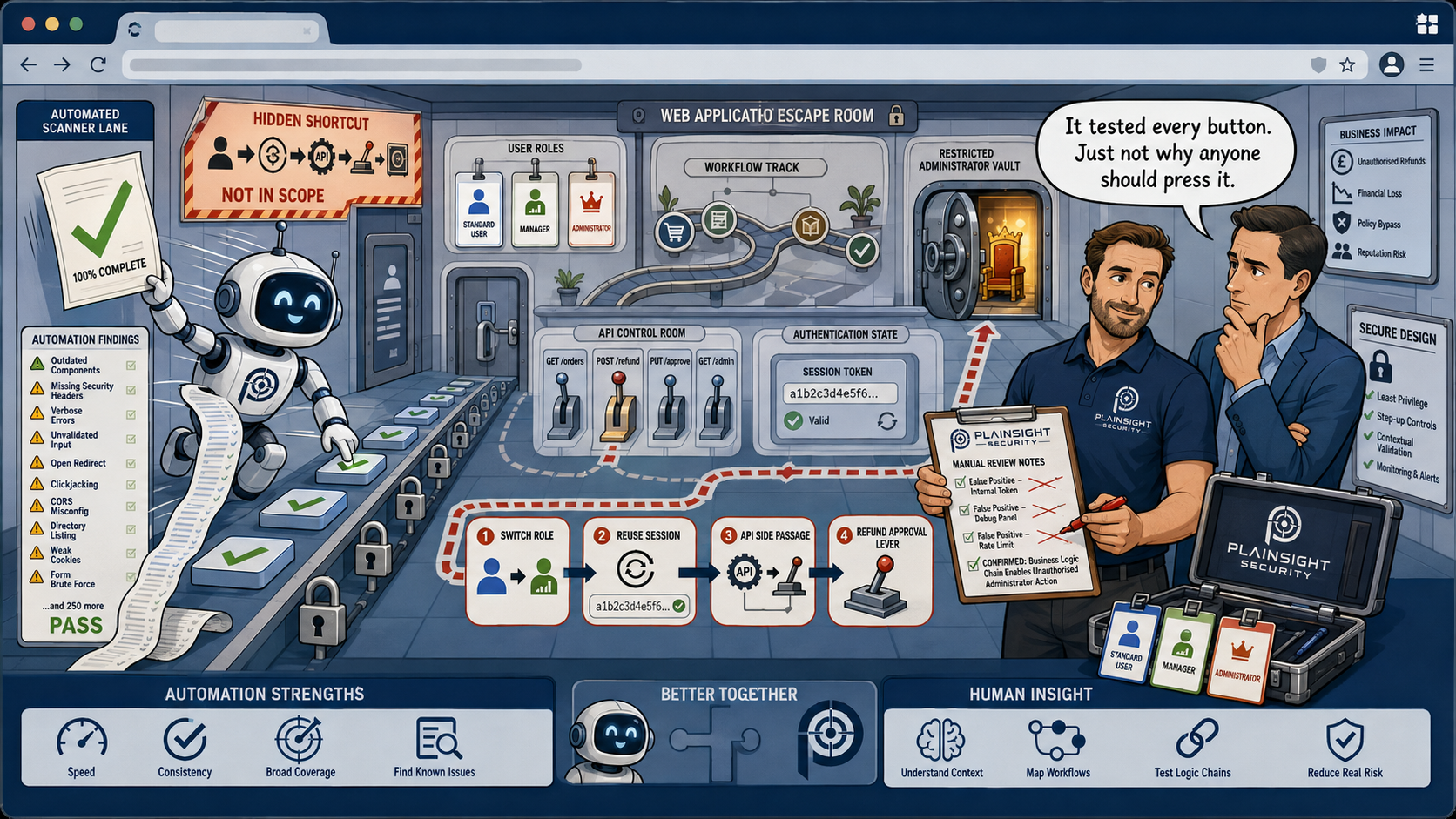
Automated web vulnerability scanning is a valuable part of application security, but it cannot replace a manual web application penetration test. Scanners are excellent at identifying many known vulnerabilities quickly, but they have limited understanding of an application's business logic, permissions and intended behaviour.
For organisations relying on web applications to process sensitive information or provide important business functionality, automated scanning should therefore be considered one part of a broader security testing strategy.
What Is Automated Vulnerability Scanning?
Automated vulnerability scanning uses software to examine a web application for known security weaknesses.
A scanner can test large numbers of URLs, parameters and application components much faster than a human tester.
Depending on the tool and configuration, automated scanning may identify issues such as:
- Known software vulnerabilities
- Security misconfigurations
- Missing security headers
- Weak TLS configurations
- Information disclosure
- Common injection vulnerabilities
- Cross-Site Scripting (XSS)
- Outdated components
- Other common web application weaknesses
This makes automated scanning extremely useful.
The problem is that finding technical weaknesses is not the same as understanding how an application can actually be attacked.
Scanning Doesn't Understand Business Logic
One of the biggest limitations of automated scanning is its difficulty in understanding business logic.
Consider an online banking application.
A scanner might be able to identify that a user can access:
/api/account/12345
However, it may not understand that account 12345 belongs to Customer A and that Customer B should never be able to access it.
This is where vulnerabilities such as IDOR and broken access control can become difficult to identify reliably through automated testing alone.
A human tester can understand the intended relationship between users, accounts and permissions and deliberately attempt to break those boundaries.
Automated Tools Don't Understand Every Permission Model
Modern applications can have complex roles and permissions.
For example:
- Standard users
- Managers
- Administrators
- Support users
- Auditors
- Different customer organisations
The application may also implement different permissions depending on the resource being accessed.
A scanner can authenticate to an application, but it may not automatically understand what each account should be allowed to do.
A penetration tester can test multiple accounts and compare their access to determine whether privilege boundaries are correctly enforced.
Authentication Can Be Complicated
Modern applications increasingly use:
- Multi-factor authentication
- Single sign-on
- OAuth
- OpenID Connect
- WebAuthn
- Conditional access
- Complex session management
These technologies can make automated scanning more difficult.
A scanner may have excellent coverage of publicly accessible functionality but limited visibility into authenticated areas.
A manual tester can work through the application's authentication process and assess functionality from the perspective of different users.
APIs Require Context
Modern web applications are often heavily dependent on APIs.
An application might have hundreds of API endpoints handling:
- User information
- Documents
- Payments
- Orders
- Administration
- Reporting
- File uploads
Automated tools can discover and test many of these endpoints.
However, the most important question is often not:
"Does this endpoint respond?"
It is:
"Who should be able to use this endpoint, and what should they be allowed to do?"
Answering that question requires understanding the application's functionality and permission model.
Automated Scanning Can Produce False Positives
Automated scanners are designed to be cautious and identify potential problems.
This can result in false positives, where a scanner reports something that appears vulnerable but isn't actually exploitable.
For example, a scanner might identify a parameter that appears susceptible to injection.
A manual tester can investigate the finding and determine:
- Whether the vulnerability is genuine
- Whether it is actually exploitable
- What data or functionality is affected
- What privileges are required
- What the realistic impact would be
This validation helps organisations focus their remediation efforts on genuine risks.
Automated Scanning Can Also Miss Vulnerabilities
False positives aren't the only problem.
Automated tools can also produce false negatives, where a vulnerability exists but isn't detected.
This can happen when vulnerabilities depend on:
- Business logic
- Complex workflows
- Multiple user accounts
- Specific application states
- Unusual input handling
- Client-side functionality
- Custom authentication
- Multi-tenant permissions
For example, an application might correctly prevent a user from accessing another customer's invoice through the normal interface but fail to enforce the same restriction through an API.
A scanner might not understand the intended relationship between the two accounts.
A skilled tester can deliberately attempt to cross that boundary.
Some Vulnerabilities Require Human Reasoning
Security testing isn't simply about finding known patterns.
A penetration tester can ask questions such as:
What happens if I perform this action in an unexpected order?
What happens if I use one user's identifier while authenticated as another?
What happens if I change my role during an active session?
Can I perform an administrative action through the API even though it isn't available in the interface?
Can I access another customer's resources?
These questions require an understanding of the application's intended behaviour.
They aren't simply signatures that a scanner can search for.
The Value of Manual Web Application Penetration Testing
Manual penetration testing complements automated scanning by examining an application from an attacker's perspective.
A tester can:
- Understand the application's functionality
- Map user roles and permissions
- Test authentication and session management
- Assess access controls
- Test business logic
- Examine APIs
- Investigate unusual application behaviour
- Validate automated findings
- Identify vulnerabilities that require multiple steps to exploit
This doesn't mean automated scanning should be abandoned.
Quite the opposite.
Automated tools can make a penetration test more efficient by quickly identifying large numbers of potential issues and areas requiring further investigation.
The most effective approach combines automation with human expertise.
Automated Scanning vs Penetration Testing
The two approaches serve different purposes.
| Automated Scanning | Manual Penetration Testing |
|---|---|
| Fast and scalable | More detailed and context-aware |
| Good at known vulnerabilities | Good at business logic weaknesses |
| Can test large numbers of endpoints | Can follow complex attack paths |
| Useful for regular monitoring | Provides deeper point-in-time assessment |
| Can produce false positives | Findings can be manually validated |
| Limited understanding of business logic | Can understand application behaviour |
Neither approach should necessarily be viewed as a replacement for the other.
Automated scanning provides useful coverage and repeatability, while manual penetration testing provides depth and context.
A Better Approach to Web Application Security
Organisations should ideally use automated scanning as part of an ongoing vulnerability management process.
Regular automated scans can help identify newly introduced vulnerabilities and changes to the application's attack surface.
Periodic penetration testing can then provide a deeper assessment of the application's security controls.
This is particularly important following:
- Major application changes
- New functionality
- Significant infrastructure changes
- Changes to authentication or authorisation
- New APIs
- Mergers or acquisitions
- Significant changes to the application's user base
Using both approaches provides broader coverage than relying on either one alone.
Conclusion
Automated web vulnerability scanning is an important security control, but it isn't a substitute for manual web application penetration testing.
Scanners are excellent at finding known technical vulnerabilities quickly and repeatedly. However, they cannot reliably understand every application's business logic, permission model or intended behaviour.
Manual penetration testing adds the human expertise needed to investigate those areas, validate automated findings and identify vulnerabilities that depend on how the application actually works.
For organisations serious about web application security, the strongest approach is not automated scanning or penetration testing.
It is automated scanning and penetration testing, used together as part of a broader security strategy.

Written by
Mark Tomlinson
Our lead penetration tester, Mark Tomlinson, holds The Cyber Scheme Team Leader qualification in infrastructure penetration testing, an advanced certification recognised by the National Cyber Security Centre (NCSC) and used by professionals testing government systems and UK critical national infrastructure. Mark is also registered with the UK Cyber Security Council as a Principal Cyber Security Professional (PriCSP) specialising in Security Testing and holds an MSc in Computer Science with Cyber Security.
More about how we workPut this into practice.
Cyber Essentials, Cyber Essentials Plus, and penetration testing — fixed-price, plain English, and built to stay out of your way.